How to Remove Gemini Watermark — 3 Steps
Drag your Gemini-generated PNG, JPG, or WebP images into the tool above — or tap to browse. Batch upload up to 10 files at once, including images from Google AI Studio.
The tool automatically detects whether your image uses the 48×48 or 96×96 pixel watermark variant and applies reverse alpha compositing locally in your browser. Nothing is sent to any server.
Results are ready in under 100ms. Download individually or grab all processed images as a single ZIP. Choose PNG, JPEG, or WebP output format.
Real Results — Before & After
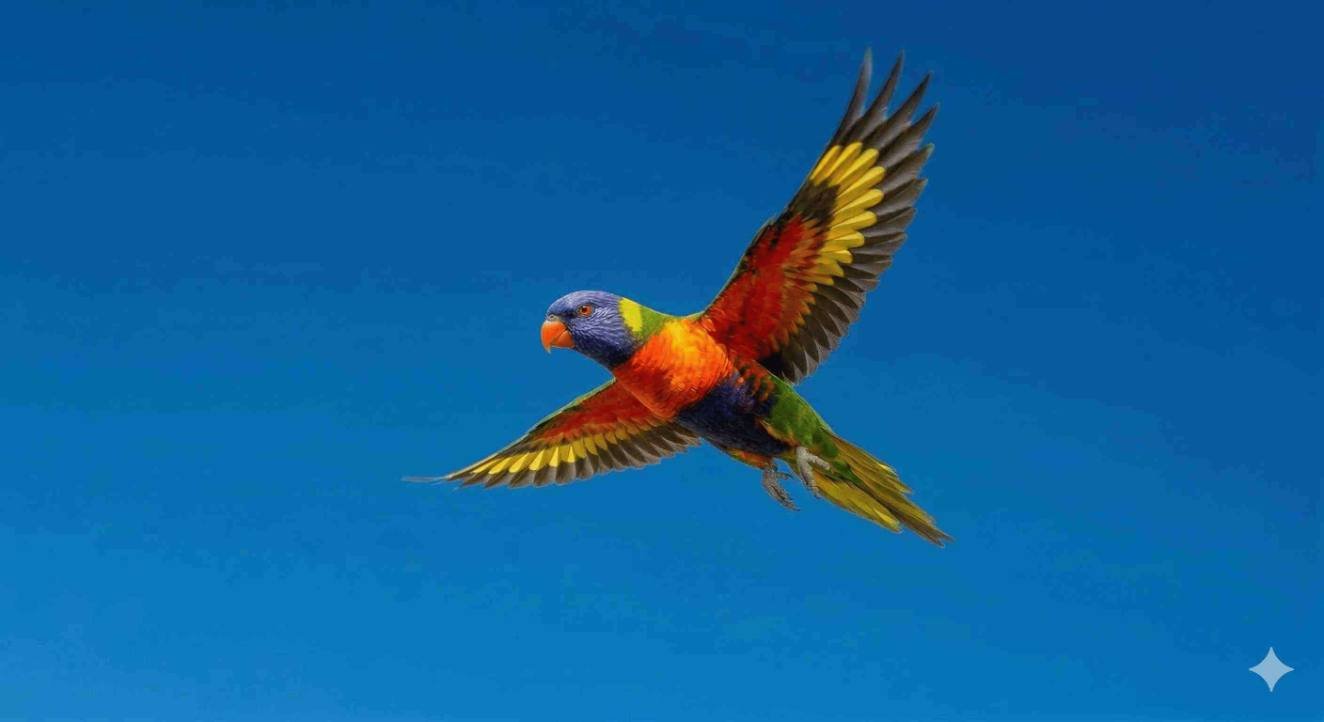
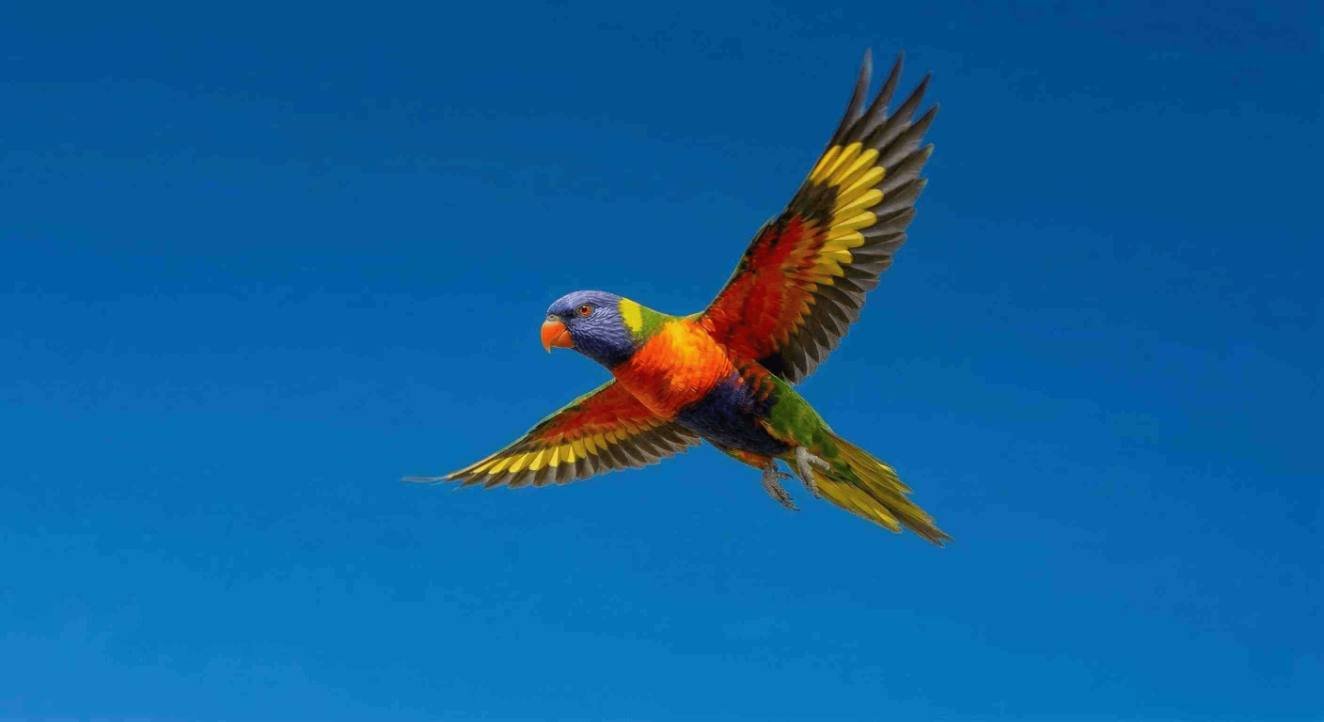
Every pixel in the watermark area is mathematically restored to within ±1 of its original value. No AI guessing, no blurring, no color fringing.
Why This Works — Reverse Alpha Compositing, Not AI Inpainting
Most watermark removal tools use AI inpainting — they look at the surrounding area and generate a plausible-looking fill. That works on plain backgrounds but fails on anything with real texture: fabric, skin, gradients, detailed scenes. The result is often a soft smear that can look worse than the watermark itself.
The Gemini watermark is fundamentally different, and that difference is what makes exact removal possible. Google applies the star overlay using a fixed mathematical formula called alpha compositing:
final pixel = (alpha × 255) + (1 − alpha) × original pixel
Where alpha is the watermark opacity at that pixel (0 = invisible, 1 = fully opaque), 255 is white (Gemini's watermark color), and original pixel is the image data hidden underneath.
Because the watermark shape, position, and opacity map are identical across every Gemini image, the formula can be reversed exactly:
original pixel = (final pixel − alpha × 255) ÷ (1 − alpha)
This recovers the original pixel values to within ±1 per channel — completely invisible to the human eye, even at 100% zoom.
| Reverse Alpha Compositing (this tool) | AI Inpainting | |
|---|---|---|
| How it works | Solves for original pixels mathematically | Generates a plausible visual guess |
| Accuracy | ±1 pixel error — near-perfect | Varies; can hallucinate detail |
| Speed | Under 100ms per image | Seconds to minutes |
| Complex textures? | Yes — math is content-agnostic | Often fails on non-plain backgrounds |
| Privacy | 100% local — no file uploads ever | Most tools require server upload |
| Best for | Fixed watermarks with a known opacity map | General object removal and image repair |
For a full technical breakdown of the alpha compositing formula and how the reverse calculation works, read: How Gemini adds watermarks to its images — and how to remove them without losing a single pixel.
Does It Also Remove Google AI Studio Images Watermark And Nano Banana Logo?
If you generate images in Google AI Studio (aistudio.google.com), the watermark — often called the Nano Banana logo — is the exact same Gemini star overlay used on gemini.google.com. This tool handles both sources identically.
Gemini currently uses two watermark sizes depending on output image dimensions:
- 48×48 pixels — applied to smaller generated images
- 96×96 pixels — applied to larger generated images
The tool auto-detects which size your image uses and selects the correct alpha map. Using the wrong size would produce visible color fringing — auto-detection prevents that entirely. You never need to configure anything manually.
This Gemini Watermark Cleaner Works on iPhone, Android, and Every Browser — No App Needed
All processing runs in your browser using JavaScript Web Workers. Nothing to install on any device.
iPhone & iPad
Open in Safari or Chrome. Tap the upload area to select from your photo library or Files app.
Android
Open in Chrome or Firefox. Tap to select from Gallery or Files. Works on all modern Android browsers.
Desktop
Chrome, Firefox, Safari, Edge. Drag and drop or click to browse. Windows, macOS, and Linux all work.
Use Save Image directly from within Gemini — don't screenshot it. Screenshots introduce compression and scaling that reduce restoration quality. Long-press the image in Gemini and tap "Save Image" to get the original file.
What Does This Online Gemini Watermark Eraser Remove and What It Doesn't?
A Gemini-generated image can carry up to three distinct layers. Understanding them prevents confusion after removal:
1. Visible Star Watermark
The semi-transparent Nano Banana star logo in the bottom-right corner. Applied via alpha compositing. This tool removes it completely using the reverse formula — pixel-perfect, no artifacts.
2. C2PA AI Credential (Invisible Metadata)
A cryptographic tag embedded in the file — this is what triggers "Made with AI" on Instagram, LinkedIn, and Pinterest even after the visible watermark is removed. Use the AI Metadata & Prompt Scrubber to strip it without touching your camera EXIF.
3. SynthID (Invisible, Frequency Domain)
A signal embedded in the image's frequency data — not pixels or metadata. No pixel-level or metadata tool can remove it. It is completely separate from the visible watermark and outside the scope of any current tool.
When Results Are Perfect — and When They May Not Be
The reverse formula is mathematically exact, but the quality of your result depends on the condition of the input image:
✓ Best Results
- Original PNG saved directly from Gemini (right-click → Save Image)
- No resizing, compression, or format conversion applied beforehand
- Watermark area does not sit over a near-pure-white background
⚠ Reduced Quality
- Image forwarded through WhatsApp, Telegram, or WeChat — these recompress images and permanently alter pixel values
- Screenshot taken instead of saved file — introduces scaling artifacts
- Watermark over a near-white area — high opacity suppresses recoverable data
✗ Doesn't Apply
- Watermarks from Midjourney, DALL-E, or Stable Diffusion
- Images already edited in the watermark area
- SynthID (frequency-domain — entirely separate system)
- Manually added text or logo watermarks
Frequently Asked Questions
How to remove Gemini watermark for free?
Upload your Gemini-generated image to the tool at the top of this page. No payment, no account, no email address required — the tool is free with no usage limits. All processing happens in your browser so there is no server cost, which is why it can be offered free forever.
How to remove the Nano Banana logo from Gemini images?
"Nano Banana" is the nickname for the Gemini star watermark — both refer to the same four-point star overlay in the bottom-right corner of Gemini-generated images. Upload your image and the tool automatically detects the watermark size (48×48 or 96×96 pixels) and removes it. Works on Gemini.google.com and Google AI Studio outputs.
How to remove Gemini watermark on iPhone or Android?
Open this page in your mobile browser — Safari on iPhone, Chrome on Android. Tap the upload area and select your image from your photo library. Everything processes locally in your browser; no app download needed. For best results, use Save Image from within Gemini rather than screenshotting — screenshots on both iOS and Android compress and scale the image in ways that reduce restoration quality.
Can I remove the Gemini watermark from Google AI Studio images?
Yes. Google AI Studio (aistudio.google.com) uses the identical Gemini watermark. Upload your AI Studio image and the tool handles it exactly as it would a Gemini.google.com image — auto-detecting the watermark size and removing it completely.
I removed the watermark but Instagram still shows "Made with AI" — why?
This is the most common point of confusion. The visible Gemini star watermark and the "Made with AI" label on Instagram are caused by two completely separate systems. This tool removes the visible star. The "Made with AI" label is triggered by an invisible C2PA content credential — a cryptographic metadata tag embedded in the file that social platforms read automatically, regardless of whether the visible watermark exists.
To remove that credential, use the AI Metadata & Prompt Scrubber — it strips the C2PA tag without touching your camera EXIF data.
How to remove Gemini watermark without losing image quality?
This tool uses reverse alpha compositing — a mathematical reversal of the exact formula Gemini used to apply the watermark. Unlike AI inpainting tools that guess what was underneath, this calculation recovers the original pixel values with an error of ±1 per channel. That margin is completely imperceptible even at 100% zoom. Pixels outside the watermark area are never touched.
Is there a gemini watermark remover without signup?
Yes — this tool. No account creation, no email address, no login of any kind is required. Open the page, upload your image, download the clean result. No usage limits and no features locked behind an account.
Can I batch remove Gemini watermarks from multiple images at once?
Yes. Upload up to 10 images at once. They are processed simultaneously using browser Web Workers and can all be downloaded together as a single ZIP file. The output format (PNG, JPEG, or WebP) and quality setting apply to the entire batch.
Why does Gemini add a watermark to generated images?
Google adds both a visible watermark and an invisible SynthID signal to AI-generated images to identify them as AI-created content. The visible star watermark is what this tool removes. SynthID (the invisible frequency-domain watermark) is a separate system and is not affected by anything this tool does.
What image formats does this tool support?
PNG, JPG/JPEG, and WebP are supported as input. Google Gemini typically generates images as PNG. For output, choose PNG, JPEG, or WebP and adjust compression quality. The watermark removal itself is lossless regardless of output format chosen.
My result has a faint color fringe — what went wrong?
A color fringe almost always means the image was recompressed before you uploaded it — by a messaging app, screenshot tool, or social platform. These permanently alter pixel values in ways that break the reverse formula. The auto-detection selects the correct alpha map, but if the pixel values were already corrupted, the calculation cannot perfectly reconstruct the original. Always use images saved directly from Gemini for best results.
Is this better than the Reddit methods for removing Gemini watermarks?
Searching "gemini watermark remover reddit" typically leads to manual Photoshop tutorials, complex Python scripts, or outdated tools. This tool automates the same reverse alpha blending math in your browser — no Photoshop, no scripts, no setup. Upload and download in under 10 seconds.
Your Images Never Leave Your Device
All computation runs inside your browser using JavaScript Web Workers. No image data is transmitted to any server — not during processing, not for logging, not for any purpose whatsoever.
You can verify this yourself: open this page, then disconnect your internet connection — the tool will continue processing images completely. There is no network activity after the initial page load.
This matters when working with unpublished designs, client assets, commercial visuals, or anything you would prefer to keep private.
Also need to remove the invisible "Made with AI" credential?
The Gemini star watermark is the visible layer — this tool removes it. But Gemini also embeds an invisible C2PA content credential that triggers "Made with AI" badges on Instagram, LinkedIn, and Pinterest even after the visible watermark is gone. The AI Metadata Scrubber strips that credential without touching your camera EXIF data.